 Loading... Please wait...
ศูนย์จำหน่ายอุปกรณ์เน็ตเวิร์คชั้นนำ ในประเทศไทย
หมวดหมู่สินค้า
- Network
- Industrial Switches
- 10/100 Switch
- 100/1000 Switch
- 2.5-10 Gbps Switch
- Accessorie
- ADSL2+ Modem/Router
- Facebook WiFi
- IP Camera
- L2/L3 Switch
- LAN Cable
- Load Balance Router
- Mesh WiFi
- NAS
- Outdoor Wireless Access Point
- PCI Express Wireless Adapter
- PoE Adapter
- PoE Switch
- Range Extender
- Smart Plug
- USB Wireless Adapter
- USB Wireless Adapter (AC)
- USB Wireless Adapter (AX)
- USB Wireless Adapter (BE)
- USB Wireless Adapter (High Power)
- VDSL Modem/Router
- VPN Router
- WiFi Bridge/Repeater
- Wireless Access Point
- Wireless Access Point (High Power)
- Wireless Access Point (Indoor)
- Wireless Controller
- Wireless Router
- Wireless Router (AC)
- Wireless Router (AX)
- Wireless Router (BE)
- Wireless Router (Dual-Band)
- Wireless Router (High Power)
- Wireless Router (Mini)
แบรนด์ยอดนิยม
ลงทะเบียนรับข่าวสาร
- หน้าแรก
- คู่มือการตั้งค่า รหัสผ่านสำหรับการใช้งาน WiFi บน EnGenius ESR-6670
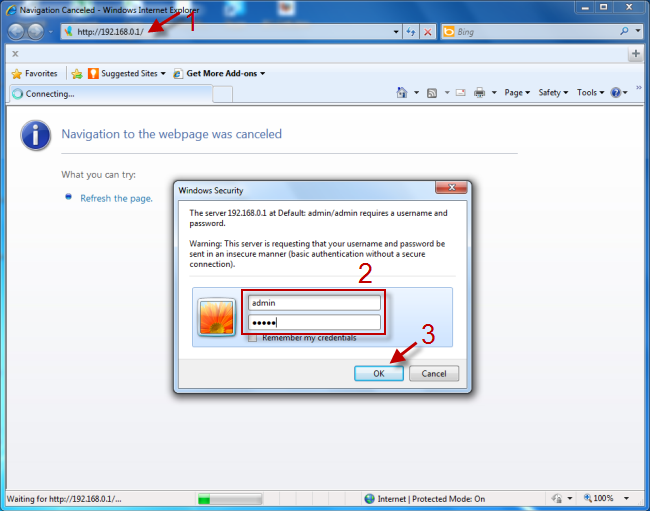
1. เข้าสู่ระบบควบคุม
1.1 พิมพ์ http://192.168.0.1
1.2 UserName = admin, Password = admin
1.3 คลิก OK
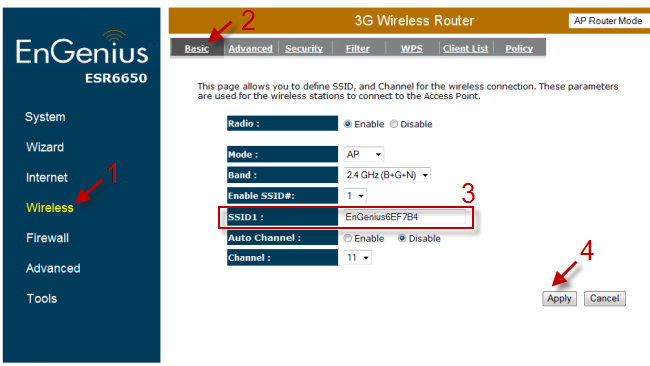
2. กำหนดชื่อ Router
2.1 คลิก Wireless
2.2 คลิก Basic
2.3 ตั้งชื่อ Router (SSID)
2.4 คลิก Apply
3.ตั้งค่ารหัสผ่าน
3.1 คลิก Wireless
3.2 คลิก Security
3.3 เลือก Encryption(ระดับความปลอดภัย) แนะนำให้ใช้ WPA pre-shared key
3.4 เลือก WPA type(ประเภทของ WPA) แนะนำให้ใช้ WPA2(AES)
3.5 พิมพ์ Pre-shared key(รหัสผ่าน)
3.6 คลิก Apply
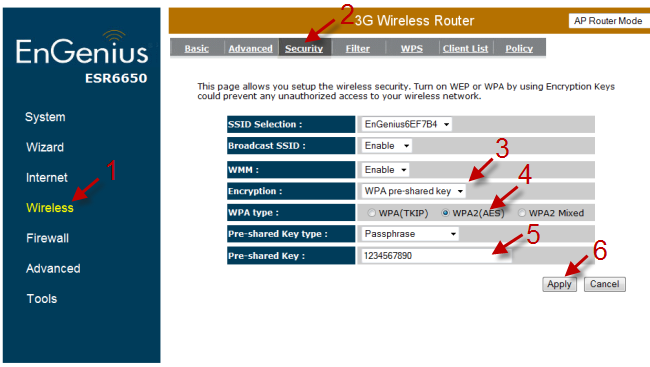
หลังจากนั้นให้ Restart เครื่องแล้วใช้งานตามปกติ